


In a modern digital workflow, file compatibility is not a minor technical detail. It is one of the main conditions that determines whether a case moves efficiently from scan intake to Dental Design, manufacturing, and final delivery. A restoration may be clinically straightforward, but if the file package is incomplete, mismatched, or poorly structured, the case can stall before meaningful design work begins.
For dental labs, clinics, prosthodontists, and oral surgeons, this is why digital file compatibility should be treated as a workflow issue rather than an IT issue. The format of the incoming data affects scan readability, articulation accuracy, implant library use, case communication, software interoperability, and production predictability. It also affects turnaround. A design team can work quickly only when the files support reliable interpretation inside the actual CAD environment being used.
The practical reality is that most digital cases do not arrive in one universal format. They arrive as a mix of open and closed files, mesh data and prescription data, scan exports and platform-linked records. STL, PLY, XML, DCM, and other formats each play different roles in the chain. Understanding that role is essential if a lab wants Dental Design to begin without unnecessary delay.
File compatibility is really about workflow compatibility
When people talk about digital compatibility, they often reduce the issue to a simple question: can the software open the file? That question matters, but it is not enough. A case can open successfully and still be incomplete for production. A file may import into the CAD system while losing occlusal relationships, color information, implant references, or prescription-linked metadata. That is where workflow problems begin.
In Dental Design, compatibility should be understood at three levels. First, the file must be readable. Second, the file must preserve the information needed for the intended restoration. Third, the file must fit into the manufacturing and communication pathway without creating manual rework. A file that satisfies only the first condition is not truly compatible in a practical sense.
From one perspective, compatibility sounds like a software topic. From another, more useful perspective, it is a case continuity topic. The design team needs to know whether the digital record arriving at intake still contains enough usable meaning to support the restoration that will eventually be fabricated. That is the real test.
Why open and closed file systems affect dental design differently
Digital dentistry operates across both open and closed workflows. Open workflows usually allow file export into broadly usable formats such as STL or PLY. Closed workflows may preserve more integrated information inside proprietary ecosystems, but they can also limit how freely the case moves between scanners, design platforms, and external labs.
This distinction matters because Dental Design is often outsourced, shared, or transferred across different digital environments. An open workflow tends to support easier external collaboration, especially for standard crown and bridge design. A closed workflow may protect data structure inside one ecosystem, but if the receiving lab cannot access the same environment, file transfer becomes more complicated.
Neither model is automatically better in all situations. Open systems support flexibility, but they may require more careful file organization to preserve meaning. Closed systems may carry structured relationships more elegantly, but they can create friction when a case needs to leave the original platform. The important point is that compatibility is not only about format. It is also about whether the file can travel where the case actually needs to go.
STL remains the most common base format, but it is not complete for every case
STL is still the most familiar file format in digital restorative workflows. It is widely used because it is simple, lightweight, and broadly accepted across CAD and CAM systems. For many routine fixed cases, STL provides enough geometric information to support Dental Design efficiently. Crown and bridge workflows often depend on it because the format is easy to export and easy to import across platforms.
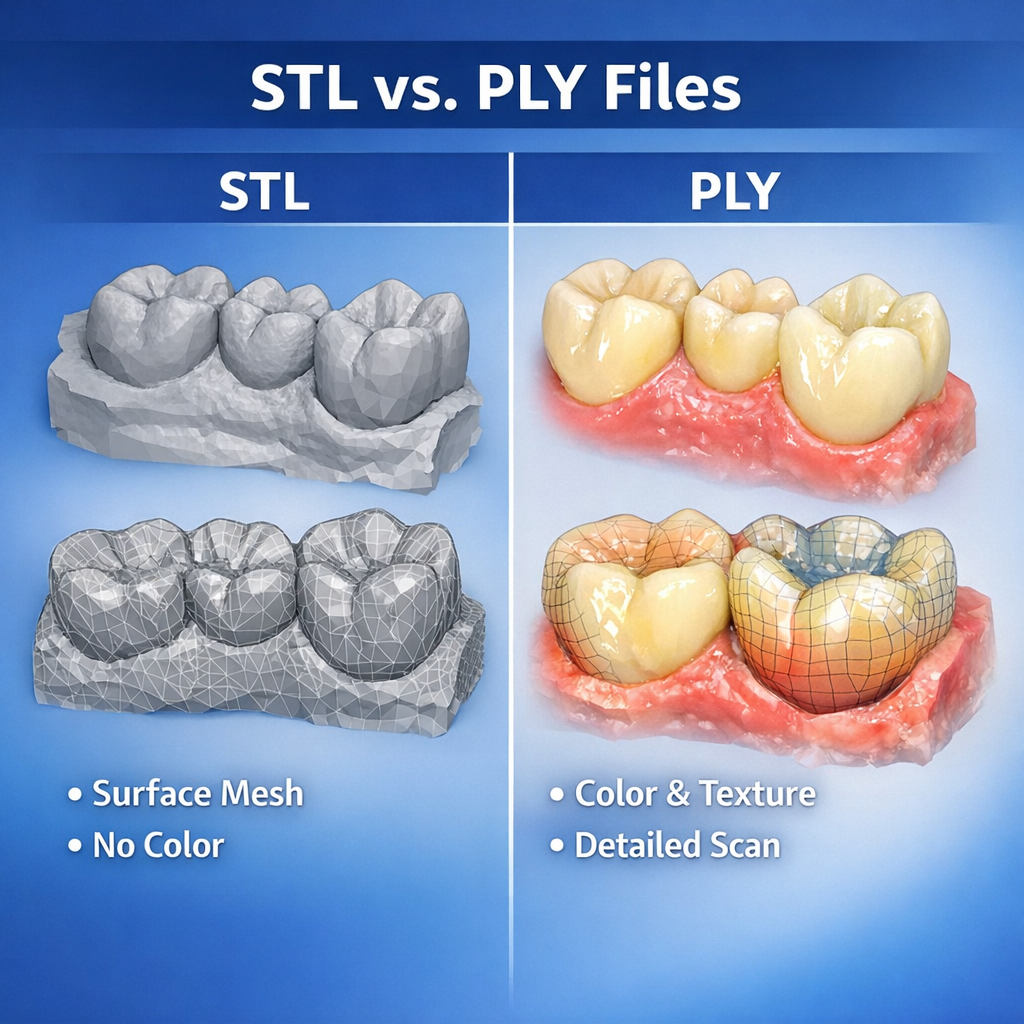
That said, STL only carries surface mesh geometry. It does not include color texture, implant system logic, shade information, or richer metadata. For straightforward posterior crowns, that limitation may not matter much. For more complex cases, it can matter a great deal. If the design team needs more than raw surface shape, STL alone may be insufficient.
This is where many workflows become subtly unstable. A lab may think, “We sent the scan.” Technically true. But if the file lacks the contextual information needed for the intended restoration, the Dental Design stage may still require clarification. STL is extremely useful, but it is not magical. It is a mesh, not a complete digital case language.
PLY adds surface richness that can matter in practical design review
PLY is often discussed alongside STL because both can carry 3D mesh data. The important difference is that PLY can also include color information. In some workflows, that extra visual data helps the design team interpret preparation boundaries, soft tissue detail, scan body capture, and other visual cues that may be less obvious in a plain mesh environment.
For Dental Design, PLY can be particularly helpful when texture improves the readability of the scan. A margin line may still require clinical preparation quality and clear scanning technique, but color data can make the case easier to assess during intake and review. This can support faster case validation, especially in situations where mesh-only data feels visually ambiguous.
That does not mean PLY is always necessary. Many excellent restorative workflows operate perfectly well with STL-based geometry. But when a scanner platform exports both STL and PLY, or when the receiving lab can benefit from texture-enhanced review, PLY can add practical value. In digital dentistry, sometimes the difference between “technically usable” and “cleanly readable” is larger than people expect.
XML matters because geometry alone is not enough
XML files are not usually the visible stars of digital dentistry, but they are extremely important in certain workflows. An XML file often carries structured case data rather than 3D geometry. Depending on the platform, it may include articulation relationships, prescription details, restoration intent, tooth designation, scan alignment logic, or case-specific metadata linked to the main scan files.
For Dental Design, XML becomes valuable because it helps preserve the case context around the mesh. A scan without structured prescription data can force the design team to reconstruct details manually. A scan paired with XML may enter the CAD environment with much more of the original workflow logic intact.
This is especially relevant when cases are exported from intraoral scanning systems or digital platforms that rely on linked file packages rather than one standalone model. If the lab receives only the visible mesh file and not the supporting XML or linked data, the case may lose information that affects efficiency. The result is not always catastrophic. It is often just annoying, slow, and surprisingly avoidable. Which, in production terms, is its own species of catastrophe.
DCM and DICOM-based data serve different purposes from standard model files
DCM generally refers to files associated with DICOM imaging data. In dentistry, DICOM data is essential in workflows involving CBCT scans, surgical planning, implant placement guidance, anatomical evaluation, and certain advanced digital integrations. These files do not function the same way as STL or PLY model files. Instead, they provide volumetric imaging information rather than simple surface geometry.
In Dental Design, DCM or DICOM data becomes especially relevant when the case extends beyond conventional restorative design into surgical guide planning, implant positioning analysis, or workflows that combine intraoral scans with radiographic anatomy. A design team working on such cases may need both the surface scan data and the imaging dataset to plan accurately.
This distinction is important because some teams assume all digital dental files are interchangeable as long as they are “3D.” They are not. STL supports model geometry. DICOM supports volumetric anatomy. XML may support structured workflow data. Each plays a different role. Sending only one when the case requires all three is a classic way to slow a complex workflow before design even starts.
Compatibility problems often come from missing file packages, not bad software
When a case fails to move smoothly into Dental Design, the software often gets blamed first. Sometimes that blame is deserved. More often, the real problem is incomplete packaging. A lab may receive an STL without the articulation reference, a PLY without the expected case notes, or an implant scan without the supporting component information. The software can only work with what it receives.
This is why file compatibility should always be discussed as a package issue, not just a format issue. A crown case may need the prep scan, antagonist, and bite. An implant case may also need scan body data, implant identification, and the correct linked records. A guide case may require surface scans plus DICOM data. When one part is missing, the file format itself is not the whole problem.
There are two ways to think about compatibility. One is narrow: does this file extension work? The other is operational: does this file package allow the case to proceed without reconstruction or assumption? The second question is the one that actually matters in daily lab work.
Implant workflows are where compatibility discipline becomes non-negotiable
Routine fixed restorations can sometimes tolerate mild workflow inconsistency. Implant cases are less forgiving. In implant-related Dental Design, file compatibility affects not only shape interpretation but also library matching, scan body positioning, restoration pathway, and manufacturing logic. A case may appear visually fine while still being structurally incomplete if the implant-specific references are not preserved.
This is why implant workflows often demand stricter intake rules. The receiving lab needs to know which files belong to the case, which system the case depends on, and whether the export pathway preserves the necessary relationships. A generic mesh alone may not be enough. If the implant context is lost, the case can become slower, riskier, or both.
For practical case management, implant compatibility should never be left to assumption. If the file package depends on a specific scanner ecosystem, platform, or linked dataset, that should be clear before the case is transferred. In implant design, ambiguity is a tiny crack that later turns into a very expensive canyon.
Software version and platform behavior affect compatibility more than many teams admit
Even when the file format itself is correct, compatibility can still be affected by software version, export settings, or platform-specific behavior. Two teams may both say they support STL, yet still encounter differences in scaling assumptions, bite import logic, or model orientation behavior. XML-linked workflows can be even more sensitive to version mismatch. DICOM integration may vary depending on the planning environment.
For Dental Design, this means compatibility should be validated in real workflow conditions, not only in theory. It is not enough to know that a format is “supported.” The lab also needs to know whether it behaves predictably inside the intended CAD environment. A case that imports with errors, loses alignment, or requires repeated manual correction is not practically compatible, even if the software technically opens it.
This is one reason mature labs build standardized intake rules around tested workflows rather than around broad assumptions. General compatibility lists are useful. Proven working pathways are better.
Strong file compatibility reduces turnaround because it reduces interpretation
The direct operational benefit of strong compatibility is speed. When the file package is complete, correctly structured, and aligned with the receiving lab’s workflow, Dental Design can start earlier and move with fewer interruptions. Intake review becomes faster. Communication becomes more specific. Quality control becomes easier because the case data is more coherent from the beginning.
By contrast, weak compatibility introduces invisible delay. The lab may need to request missing files, rebuild relationships manually, verify implant context, or interpret unclear exports. None of these tasks looks dramatic on a production chart, but together they erode turnaround, consistency, and design stability.
This is why digital compatibility should be seen as part of case quality. It is not a background convenience. It is one of the structural conditions that determine whether a digital case is actually ready for design.
What labs should provide to support file compatibility from the start
For a smooth Dental Design workflow, labs should send a complete file package rather than isolated files. That includes the primary scan geometry, bite data, antagonist data, linked XML or metadata files when relevant, implant-specific references where applicable, and DICOM data for cases involving radiographic planning. The case should also be clearly identified, and the restoration intent should be stated in a way that matches the digital package.
Just as important, the sending team should know the receiving lab’s accepted formats and tested workflow conditions before urgent cases appear. Compatibility planning is much easier before the goblins of last-minute confusion arrive with clipboards and chaos.
Conclusion
Digital file compatibility in Dental Design is not just a matter of whether a lab accepts STL, PLY, XML, DCM, or other formats. It is a matter of whether the full digital package preserves the information needed for case review, design execution, manufacturing planning, and predictable communication. Each format serves a different role. STL supports broad mesh exchange. PLY can add valuable visual detail. XML often preserves structured case logic. DCM and DICOM data support imaging-based workflows beyond surface models.
For dental labs, clinics, prosthodontists, and oral surgeons, the practical lesson is clear: a compatible file is not simply a file that opens. It is a file package that carries the case forward without forcing the design team to reconstruct missing meaning. In a digital production system, that difference is where workflow stability begins.