


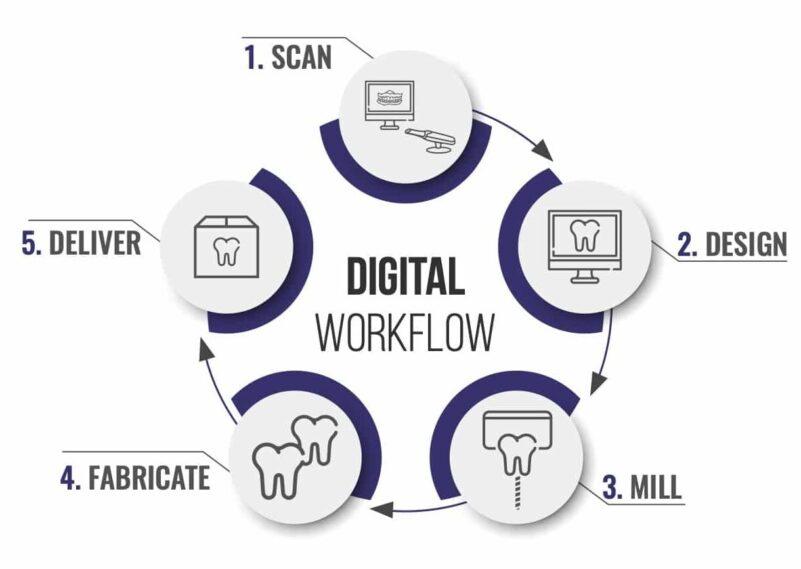
In digital dental production, the decision between maintaining an internal CAD design team and working with an external partner is often framed as a question of control versus cost. In practice, the more relevant comparison is operational: how each model performs within a structured workflow and how it scales under variable demand.
In-house vs outsourced dental CAD is not a binary choice of capability. Both models can produce technically accurate designs. The difference lies in how each approach manages workflow continuity, absorbs variability, and maintains consistency across case volumes and complexity levels.
This article evaluates in-house and outsourced CAD design from a workflow perspective, focusing on intake discipline, processing stability, communication structure, and scalability.
Understanding CAD Design as a Workflow Node
Before comparing models, it is important to position CAD design correctly within the workflow. Design is not an isolated activity; it is a central node connecting:
- Case intake and data validation
- Occlusal and anatomical design decisions
- Manufacturing preparation and output
Any disruption at this stage affects both upstream and downstream processes. Therefore, the evaluation of in-house vs outsourced dental CAD should focus on how each model maintains stability at this critical node.
Intake Dependency: How Each Model Handles Input Variability
In-House CAD Design
Internal teams often operate in close proximity to case intake. This allows:
- Immediate access to submitted data
- Faster informal communication with clinicians
- Greater flexibility in handling incomplete cases
However, this flexibility can introduce inconsistency. Designers may proceed with partial information, relying on assumptions to maintain speed.
Outsourced CAD Design
External workflows typically enforce stricter intake validation:
- Cases are reviewed for completeness before design begins
- Missing information results in case pausing
- Standardized submission requirements are applied
This approach ensures that only validated cases enter the design queue.
Workflow Implication
From a workflow perspective, outsourcing emphasizes input discipline, while in-house models often prioritize immediate processing. The former reduces downstream variability, while the latter may increase it.
Workflow Continuity and Interruption Management
In-House Model
In internal environments:
- Designers often manage multiple roles, including communication and troubleshooting
- Interruptions occur when clarification is needed
- Workflow can become fragmented due to task switching
This is particularly evident in high-volume settings where case complexity varies.
Outsourced Model
In outsourced environments:
- Design workflows are typically segmented from intake and communication
- Only validated cases are processed
- Designers operate within uninterrupted queues
This separation reduces mid-process interruptions and supports continuous workflow execution.
Workflow Comparison
In in-house vs outsourced dental CAD, the key difference lies in how interruptions are handled:
- In-house: interruptions are absorbed within the design process
- Outsourced: interruptions are filtered out at intake
This structural difference has a direct impact on efficiency and predictability.
Turnaround Time: Stability vs Responsiveness
Turnaround time is often used as a comparison metric, but its interpretation differs between models.
In-House Turnaround Characteristics
- Potential for rapid response on individual cases
- Flexibility to prioritize urgent cases immediately
- Variability depending on team workload
While individual cases may be processed quickly, overall consistency may fluctuate.
Outsourced Turnaround Characteristics
- Defined processing timelines based on case type and volume
- Turnaround begins after case validation
- Greater consistency across cases
Design timelines are structured according to complexity and completeness rather than immediate availability.
Workflow Comparison
In-house models emphasize responsiveness, while outsourced models emphasize consistency. The choice depends on whether the workflow prioritizes flexibility or predictability.
Design Consistency and Standardization
In-House Variability
Internal teams may develop individual design habits:
- Differences in margin interpretation
- Variations in occlusal design
- Inconsistent parameter application
While this allows flexibility, it can lead to variability across cases.
Outsourced Standardization
Outsourced workflows typically rely on:
- Defined design protocols
- Standardized parameter settings
- Consistent quality control processes
This reduces variability and supports repeatable outcomes.
Impact on Workflow
Consistency in design reduces the need for:
- Adjustments during production
- Remakes due to design discrepancies
- Case-specific troubleshooting
From a workflow perspective, standardization supports scalability.
Communication Structure and Its Effect on Efficiency
In-House Communication
Communication within internal teams is often informal:
- Direct interaction between clinicians and designers
- Faster clarification for simple issues
- Potential lack of documentation
While efficient for small teams, this approach may not scale effectively.
Outsourced Communication
External workflows rely on structured communication:
- Defined submission formats
- Documented case instructions
- Formal feedback loops
Case tracking systems may be used to monitor progress and updates.
Workflow Implication
Structured communication reduces ambiguity and supports consistent processing, especially in high-volume environments.
Scalability Under Increasing Case Volume
In-House Scalability
Scaling internal design capacity requires:
- Hiring and training additional designers
- Expanding infrastructure
- Managing team coordination
This process is resource-intensive and may lag behind demand.
Outsourced Scalability
Outsourcing allows:
- Flexible allocation of design capacity
- Handling of peak volumes without internal expansion
- Distribution of workload across larger teams
This enables more immediate scalability without structural changes.
Workflow Comparison
In in-house vs outsourced dental CAD, scalability is a key differentiator:
- In-house: capacity is fixed and grows incrementally
- Outsourced: capacity is variable and adjusts to demand
Handling Complex Cases and Specialized Requirements
In-House Strengths
Internal teams may have:
- Direct familiarity with specific clinicians’ preferences
- Greater flexibility in handling unique cases
- Immediate access to contextual information
This can be advantageous for highly customized restorations.
Outsourced Capabilities
Outsourced partners often:
- Handle a wide range of case types
- Apply standardized approaches to complex workflows
- Require clear communication for customization
Complex cases may require more structured input to achieve desired outcomes.
Workflow Consideration
The effectiveness of either model depends on how well complexity is managed through communication and process control.
Quality Control Integration
In-House QC
Quality control is often integrated within the design process:
- Designers self-check their work
- Additional QC steps may vary depending on workload
This approach relies on individual consistency.
Outsourced QC
Outsourced workflows typically include:
- Dedicated intake QC
- Design-level validation
- Pre-production checks
This layered approach reduces cumulative errors.
Impact on Workflow
Structured QC reduces rework and supports more predictable outcomes across cases.
Risk Distribution and Dependency
In-House Risk Profile
- Dependence on a limited number of designers
- Risk of workflow disruption due to staff availability
- Internal bottlenecks during peak demand
Outsourced Risk Profile
- Dependence on external coordination
- Potential delays if communication is incomplete
- Reduced risk of capacity limitations
Workflow Perspective
Each model distributes risk differently. The choice depends on whether the workflow prioritizes internal control or external flexibility.
Hybrid Models: Combining In-House and Outsourcing
In practice, many laboratories adopt a hybrid approach:
- Core cases handled internally
- Overflow and standardized cases outsourced
This allows:
- Retention of internal expertise
- Flexible scaling during peak periods
- Balanced control and efficiency
From a workflow perspective, hybrid models aim to combine the strengths of both approaches.
Decision Framework Based on Workflow Priorities
When evaluating in-house vs outsourced dental CAD, the decision should be based on workflow priorities rather than assumptions.
When In-House May Be Preferred
- Low to moderate case volume
- High need for customization
- Strong internal design team
When Outsourcing May Be Preferred
- High or variable case volume
- Need for consistent turnaround
- Focus on workflow standardization
When Hybrid Models Are Effective
- Mixed case complexity
- Fluctuating demand
- Need for both flexibility and control
Conclusion: Workflow Structure Determines the Better Model
The comparison between in-house and outsourced CAD design is not about which model is inherently superior. It is about how each model supports the overall workflow.
In-house vs outsourced dental CAD should be evaluated based on:
- How well input variability is managed
- How consistently cases move through the design stage
- How effectively the system scales with demand
In digital dental production, efficiency is achieved not by optimizing individual steps, but by maintaining continuity across the entire workflow. The model that best supports this continuity will deliver the most predictable and scalable results.