


PFM ON IMPLANT

PFM ON IMPLANT

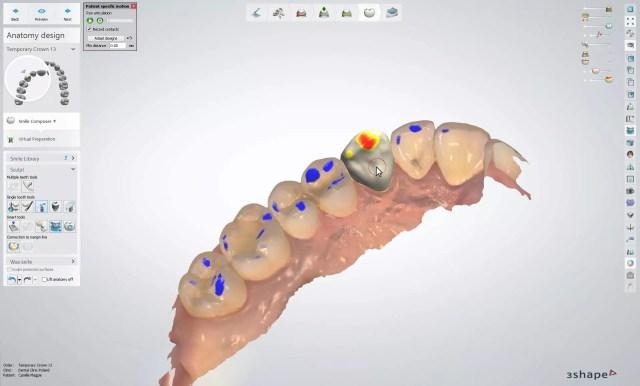
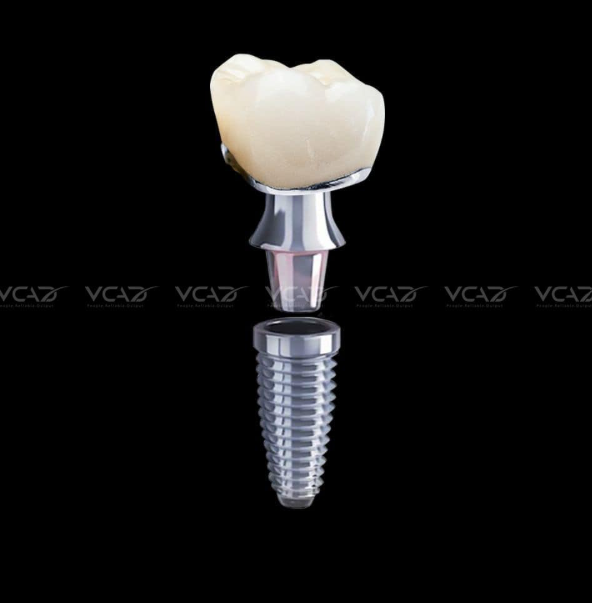
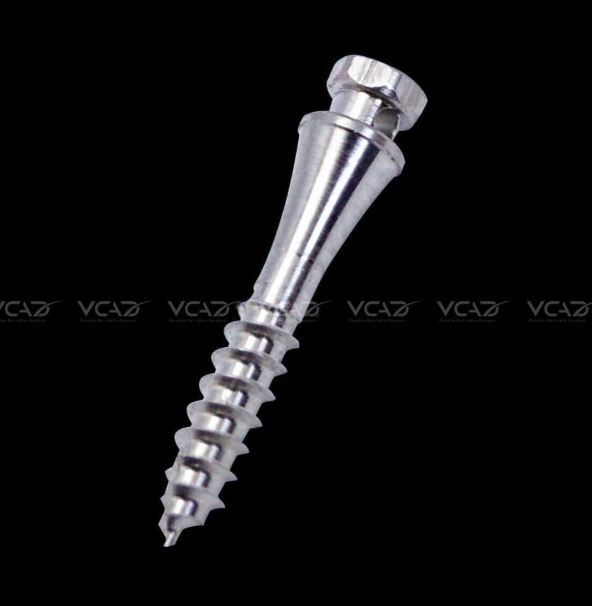
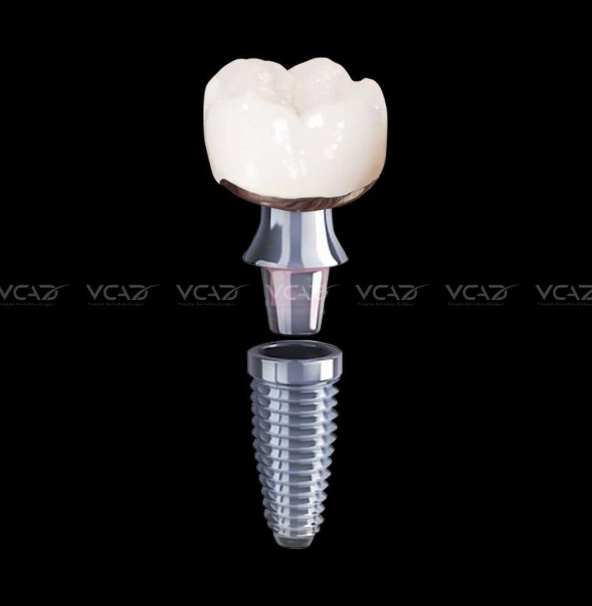
PFM on Implant: The implant post functions as an artificial tooth root, surgically placed into the jawbone, while PFM (Porcelain-Fused-to-Metal) crowns offer natural-looking restorations combined with the durability of metal

Materials

Zirconia/ E.Max/ Titan/ Co-Cr

STANDARD TURNAROUND TIME

1 day

PRODUCTIVITY

200 units/day

ORDER INSTRUCTION

STAGE 1

RECEIVED ORDERS

1. PREPARE INFORMATION BELOW:
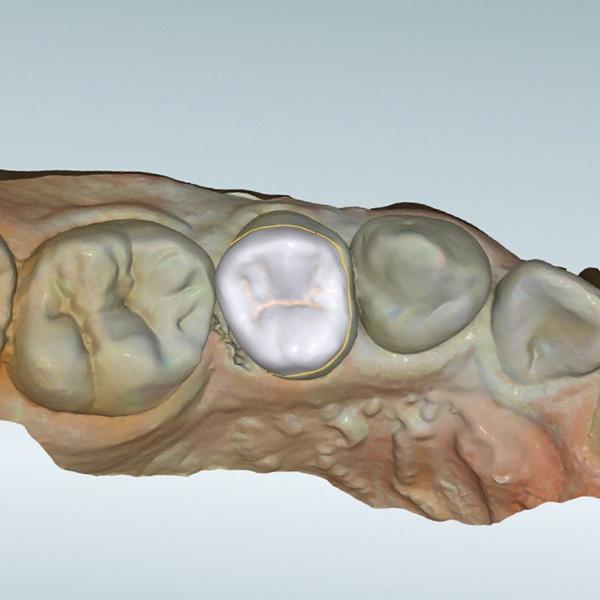
– Bite impression files (Support File scan with formats: *.stl, *.ply, *.xml, *.dcm *.mtl,*.obj (3D object)) or physical impresion
– Physical bite impression
– Material instruction: Zirco, Emax,etc.
– Detail instruction: Style, Shape, RX form or Clinic form

2. SEND ORDER

– How to send: (Wetransfer, Itero, Google Drive link to download) via email
OR Send directly to WhatsApp
– Order email: production@vcaddental.com
– Online Form Order: click here

NOTE
– Diameter: 1.3mm
– We use Exocad 3.1; 3Shape 2020 & 2021
– Turnaround time: 8 hours (UNDER 8 units),
10 – 12h (MORE than 8 units)
the turnaround time might take to the next day if its in the night time.

STAGE 2

PROCEEDING

1. CHECK INFORMATION
Once received, we’ll review your order and get back to you within a few hours if any clarification is needed or additional information.

2. DESIGN PRODUCT
After confirm your information, we’ll begin the design process.
– Our default parameters below:

STAGE 3

PAYMENT & SHIPMENT

1. QUALITY CHECK
Once ready, you can review the final design and, if no adjustments are needed, proceed with payment.

2. PAYMENT
You will receive the invoice via Email or Whatsapp
(Bank account transfer or Paypal)

3. RECEIVE YOUR COMPLETED DESIGN
After payment, you’ll get the final files via email, WhatsApp, or Google Drive link to download.

STAGE 1

RECEIVED ORDERS

1. PREPARE INFORMATION BELOW:
– Bite impression files (Support File scan with formats: *.stl, *.ply, *.xml, *.dcm *.mtl,*.obj (3D object)) or physical impresion
– Physical bite impression
– Material instruction: Zirco, Emax,etc.
– Detail instruction: Style, Shape, RX form or Clinic form

2. SEND ORDER

– How to send: (Wetransfer, Itero, Google Drive link to download) via email
OR Send directly to WhatsApp
– Order email: production@vcaddental.com
– Online Form Order: click here

NOTE
– Diameter: 1.3mm
– We use Exocad 3.1; 3Shape 2020 & 2021
– Turnaround time: 8 hours (UNDER 8 units),
10 – 12h (MORE than 8 units)
the turnaround time might take to the next day if its in the night time.

STAGE 2

PROCEEDING

1. CHECK INFORMATION
Once received, we’ll review your order and get back to you within a few hours if any clarification is needed or additional information.

2. DESIGN PRODUCT
After confirm your information, we’ll begin the design process.
– Our default parameters below:

STAGE 3

PAYMENT & SHIPMENT

1. QUALITY CHECK
Once ready, you can review the final design and, if no adjustments are needed, proceed with payment.

2. PAYMENT
You will receive the invoice via Email or Whatsapp
(Bank account transfer or Paypal)

3. RECEIVE YOUR COMPLETED PRODUCT
After payment, you’ll get the final product sent by DHL, FedEx.

Welcome to our site

This is Subtitle

In modern dental laboratories and clinics operating within a digital workflow, efficiency is rarely limited by a single factor. Instead, it is shaped by how well each stage—case intake, design, manufacturing, and communication—connects without interruption. Among these stages, CAD design has increasingly become a critical bottleneck, especially as case volume grows and complexity increases.

Dental CAD design outsourcing is not simply a cost or staffing decision. It is a workflow strategy that directly impacts turnaround predictability, internal resource allocation, and overall case consistency. When structured correctly, outsourcing design functions as a stabilizing layer within the production system rather than an external dependency.

This article examines how outsourcing CAD design improves workflow efficiency by addressing common operational constraints in modern labs.

Where Workflow Bottlenecks Typically Occur in Digital Dental Labs


In a fully digital environment, design sits between data acquisition and manufacturing. Any delay or inconsistency at this stage propagates downstream.

Several recurring bottlenecks can be observed:

  • Design capacity mismatch: Case intake volume fluctuates, but in-house design teams are typically fixed in size.

  • Peak-hour congestion: Cases accumulate during specific submission windows, leading to queue delays.

  • Complex case interruption: Full-arch, implant, or multi-unit restorations require extended design time, disrupting standard case flow.

  • Rework cycles: Incomplete scans or unclear prescriptions lead to design revisions, increasing turnaround time.


These issues are not caused by a lack of technology but by limitations in how design resources are distributed and managed.

CAD Design as a Workflow Control Point


CAD design is not just a technical step; it is a control point where multiple variables converge:

  • Scan quality and completeness

  • Prescription clarity

  • Material and thickness parameters

  • Occlusal scheme and articulation logic

  • Software compatibility (Exocad, 3Shape, etc.)


If this stage is delayed or inconsistent, downstream manufacturing cannot proceed efficiently. In many labs, even when milling or printing capacity is sufficient, production stalls because design output is not delivered in a stable, predictable rhythm.

Outsourcing design shifts this control point from an internal constraint to a managed external process.

How Dental CAD Design Outsourcing Redistributes Workload


The most immediate impact of dental CAD design outsourcing is the redistribution of workload. Instead of expanding internal teams to handle peak demand, labs can externalize variable design volume.

This creates two operational effects:

1. Separation of Fixed and Variable Capacity


  • In-house team: Handles core cases, high-priority adjustments, and communication-intensive designs

  • Outsourced team: Absorbs overflow, standardized cases, and scalable volume


This separation allows internal teams to maintain focus without being overwhelmed by volume spikes.

2. Continuous Design Availability


Outsourcing providers often operate across extended working hours or multiple time zones. This enables:

  • Overnight design processing

  • Reduced idle time between case submission and design initiation

  • Faster case turnover without increasing internal workload


In practice, this transforms design from a queued activity into a continuous flow.

Impact on Turnaround Time and Case Throughput


Turnaround time in dental workflows is not determined solely by how fast a design is completed, but by how consistently cases move through each stage.

Outsourcing contributes to:

  • Reduced queue time before design begins

  • Parallel processing of multiple cases

  • Predictable design delivery windows


For example, when design turnaround is standardized (e.g., within defined hourly windows for small cases and structured timelines for complex cases), labs can align manufacturing schedules more precisely.

This predictability is more valuable than raw speed because it allows:

  • Better scheduling of milling and finishing

  • Reduced technician idle time

  • More accurate delivery commitments to clinics


Quality Control and Its Role in Preventing Workflow Delays


A common misconception is that outsourcing introduces quality risks. In reality, workflow inefficiency is more often caused by poor case intake and unclear design parameters than by the design process itself.

Structured outsourcing workflows typically include:

  • Pre-design quality control (QC)

  • Verification of scan completeness (preparation, antagonist, bite)

  • Confirmation of prescription details before design begins


If required information is missing, cases are paused until clarification is provided.

While this may appear to delay individual cases, it prevents:

  • Design errors

  • Remakes

  • Downstream adjustments


From a system perspective, this reduces total cycle time across all cases.

File Compatibility and Workflow Integration


One of the technical barriers in digital dentistry is file compatibility. Labs and clinics may operate on different systems, producing various file formats:

  • STL, PLY for geometry

  • XML for workflow data

  • DCM for imaging

  • OBJ, MTL for advanced modeling


Outsourced design providers typically support multi-format intake and conversion, allowing seamless integration into existing workflows.

This reduces:

  • Manual file conversion

  • Software-related delays

  • Communication errors between clinic and lab


As a result, case intake becomes more standardized and less dependent on internal technical troubleshooting.

Case Communication and Instruction Clarity


Efficiency in CAD design is directly tied to how clearly cases are communicated. Outsourcing environments tend to formalize this process.

Typical structured requirements include:

  • Defined scan sets (preparation, antagonist, bite)

  • Material and thickness specifications

  • Margin clarity

  • Software version alignment


For complex cases such as full-arch restorations, additional data may be required, including facial references or patient-specific parameters.

This structured communication reduces ambiguity and ensures that design output aligns with clinical expectations from the first iteration.

Reducing Remakes Through Systematic Design Input


Remakes are one of the most significant sources of inefficiency in dental workflows. They consume:

  • Additional design time

  • Manufacturing resources

  • Shipping and coordination effort


Outsourcing contributes to remake reduction by enforcing:

  • Strict intake validation

  • Consistent design protocols

  • Repeatable parameter application


Because outsourced teams often operate with standardized workflows, variability between cases is reduced. This consistency improves first-fit accuracy and minimizes adjustment requirements.

Allowing In-House Teams to Focus on High-Value Tasks


When design workload is partially outsourced, internal teams are no longer required to manage all cases end-to-end.

This allows reallocation of resources toward:

  • Complex implant planning

  • Case troubleshooting

  • Final quality verification

  • Direct communication with clinicians


In effect, outsourcing shifts internal labor from volume processing to decision-making and quality control, which are higher-value functions within the workflow.

Managing Priority and Case Segmentation


Not all cases require the same turnaround or level of attention. Efficient workflows segment cases based on urgency and complexity.

Outsourcing enables:

  • Priority-based processing (urgent cases handled separately)

  • Batch handling of standard cases

  • Flexible allocation based on deadlines


When large case volumes are involved, labs can define which cases need immediate attention and which can follow standard timelines.

This level of control is difficult to maintain with a purely in-house team operating at full capacity.

Workflow Stability vs. Speed Optimization


From a systems perspective, the primary benefit of dental CAD design outsourcing is not maximum speed but workflow stability.

Two contrasting perspectives can be observed:

Perspective 1: Speed-Centric Approach


  • Focus on completing designs as quickly as possible

  • Relies on expanding internal teams

  • Often leads to variability and burnout


Perspective 2: Flow-Centric Approach


  • Focus on maintaining continuous, predictable workflow

  • Uses outsourcing to absorb variability

  • Prioritizes consistency over peak performance


In practice, the second approach leads to higher long-term efficiency because it reduces interruptions, rework, and scheduling conflicts.

Limitations and Considerations


Outsourcing is not a universal solution. Its effectiveness depends on how it is integrated into the workflow.

Potential challenges include:

  • Misalignment in design expectations if communication is unclear

  • Delays when case data is incomplete

  • Dependence on external coordination if not properly managed


However, these issues are typically process-related rather than inherent to outsourcing itself. When intake protocols and communication standards are well-defined, these risks are minimized.

Conclusion: Outsourcing as a Structural Workflow Strategy


Dental CAD design outsourcing should not be viewed as an external add-on but as a structural component of modern digital workflows.

By redistributing workload, enforcing intake discipline, and enabling continuous design flow, outsourcing addresses one of the most critical bottlenecks in dental production systems.

For labs and clinics managing increasing case volume and complexity, the question is not whether design can be completed internally, but whether the overall workflow can remain stable, predictable, and scalable without external support.

 
Long-term growth in dentistry does not come from volume alone. It comes from building a workflow that can handle more cases without losing control of quality, turnaround stability, communication clarity, or manufacturing consistency. For dental labs, clinics, prosthodontists, and oral surgeons, this is where a Professional Dental outsourcing lab becomes strategically important. The role of an outsourcing partner is not limited to case overflow. In a mature digital environment, the right partner supports growth by making the workflow more scalable, more repeatable, and less vulnerable to operational friction.

This matters because growth creates pressure in several directions at once. More case volume increases design demand. A broader case mix adds technical complexity. Faster clinical scheduling reduces tolerance for delay. Digital workflows introduce more file handling requirements, more software dependencies, and more coordination across teams. If these pressures are absorbed through improvisation alone, the system becomes unstable. A professional outsourcing lab helps prevent that instability by introducing structure where expansion would otherwise create inconsistency.

That is why long-term growth should not be discussed only in terms of sales, new accounts, or production numbers. In technical dentistry, growth is sustainable only when the workflow can expand without quietly increasing remake risk, communication failure, or design-to-manufacturing mismatch. A strong outsourcing partner supports exactly that kind of growth.

Growth becomes fragile when workflow capacity grows slower than case demand


Many dental businesses assume growth problems will appear mainly at the business development level. In practice, the first real strain often appears inside production. A lab may gain more clients, a clinic may increase digital case submissions, or a specialist may broaden the range of implant and restorative work being handled. At first, this looks positive. Then the internal design queue becomes congested, communication slows, turnaround becomes uneven, and routine cases start competing for attention with complex ones.

This is one of the clearest reasons a Professional Dental outsourcing lab supports long-term growth. It expands functional capacity without requiring every increase in demand to be absorbed immediately by internal hiring, retraining, or rushed process changes. More importantly, it does so within a technical workflow rather than outside it. The partner becomes part of the case pathway, helping manage intake, design support, fabrication logic, and coordination under higher volume conditions.

From one angle, outsourcing may seem like a temporary solution for busy periods. From another, more operationally useful angle, it is a structural solution for growth management. The second view is usually more accurate when the goal is not simply to survive a busy month, but to support growth over years without degrading consistency.

Long-term growth depends on repeatable systems, not heroic effort


In small or early-stage operations, growth can sometimes be sustained by extra individual effort. A technician stays late. A designer handles more cases than usual. A case manager manually resolves file problems one by one. This can work for a while. But it is not a scalable model. Growth supported only by human improvisation eventually becomes vulnerable to fatigue, inconsistency, and preventable errors.

A professional outsourcing structure helps replace heroic effort with repeatable process. That is one of the deeper advantages of a Professional Dental outsourcing lab. The partner does not merely add hands. It adds systems: file intake rules, case categorization logic, CAD design protocols, communication checkpoints, and production-aware review steps. These systems make the workflow less dependent on individual rescue behavior and more capable of handling sustained volume.

This distinction matters because long-term growth is not just an increase in demand. It is an increase in exposure to small operational failures. Every unclear prescription, incomplete scan, delayed clarification, or unstable design choice becomes more costly as volume rises. Repeatable systems reduce this risk. And in dentistry, risk reduction is often what allows growth to remain profitable rather than merely busy.

A professional outsourcing lab helps stabilize turnaround as volume increases


One of the first things growth tends to disrupt is turnaround consistency. When more cases arrive, design queues lengthen. When case complexity rises, routine units may wait behind larger or more technical cases. When internal teams are stretched, priorities become harder to manage. This is where a professional partner can create real operational value.

A Professional Dental outsourcing lab supports long-term growth by helping stabilize the early and middle stages of production. Standard cases can be routed efficiently. Overflow design can be absorbed without collapsing internal schedules. More complex categories can be triaged properly instead of forcing every case through the same bottleneck. This improves not only speed, but schedule predictability.

That point is important. Long-term growth does not benefit from occasional bursts of fast performance if the workflow remains unstable overall. What matters more is dependable rhythm. Clinics and labs need to know how work moves under normal conditions, under busy conditions, and under mixed case conditions. A professional outsourcing workflow supports that rhythm by smoothing capacity fluctuations before they become systemic delays.

File quality and intake discipline become more important as operations expand


Growth multiplies the consequences of weak submission habits. A small number of incomplete scans or vague prescriptions may be manageable in a low-volume setting. In a growing operation, those same problems can create repeated interruption across many cases. That is why one of the most valuable contributions of an outsourcing partner is stronger intake discipline.

A mature outsourcing lab does not simply receive files and start designing. It reviews whether the case is ready. It checks whether the digital package is complete. It identifies missing information early. In the context of long-term growth, this is extremely useful because it prevents expansion from being built on bad intake habits. A Professional Dental outsourcing lab helps the sending team become more disciplined as well, because the relationship encourages cleaner file preparation, clearer prescriptions, and more structured communication.

This creates a two-sided benefit. The outsourcing lab works more efficiently because incoming data is more usable. The sending lab or clinic also becomes operationally stronger because its own submission standards improve over time. That is one of the subtle ways outsourcing supports growth: it strengthens the upstream process, not only the downstream workload.

Consistent CAD design supports scalable quality


As operations grow, variability becomes more dangerous. If similar cases are designed differently from one week to the next, manufacturing becomes less predictable, adjustment time increases, and confidence in the workflow starts to erode. This is why consistency in CAD design matters so much for sustainable expansion.

A professional outsourcing lab helps by applying more stable design logic across routine and moderately complex cases. Contact strategy, occlusal balance, emergence control, connector behavior, internal fit planning, and production-aware anatomy can be managed with repeatable standards. A Professional Dental outsourcing lab supports growth not because it removes judgment from design, but because it reduces unnecessary variation in how judgment is applied.

From one perspective, design consistency sounds like a quality issue. From another, it is also a growth issue. A business cannot scale effectively if every additional case introduces new unpredictability into production. Stable design standards allow larger case volume to move through the system with less friction. That is one of the quiet foundations of long-term operational growth.

Broader case capability supports strategic expansion


Growth is not always about more of the same work. Often it involves handling a wider range of cases. A lab may expand from routine crown and bridge work into implants, removable prosthetics, night guards, or surgical guides. A clinic may move from standard restorations into more digitally integrated prosthetic and surgical workflows. These shifts require more than capacity. They require technical breadth.

This is another reason a Professional Dental outsourcing lab can support long-term growth. A capable partner allows an operation to broaden its service range without building every specialty entirely in-house at the beginning. That does not mean internal expertise becomes unimportant. It means the path to expansion becomes more manageable. The business can enter new technical categories with support from a partner already structured around those workflows.

This approach reduces growth risk. Instead of overcommitting internal resources before demand is stable, the operation can expand more selectively. It can test workflow compatibility, refine communication patterns, and understand the demands of each new category while still protecting daily operations.

Manufacturing awareness matters when growth increases case complexity


Many scaling problems do not begin in design alone. They begin when design and manufacturing drift apart. As volume increases, a workflow becomes more vulnerable to designs that are technically acceptable on screen but less stable in milling, printing, finishing, or assembly. Long-term growth requires stronger connection between digital planning and production behavior.

A professional outsourcing lab supports this by designing with fabrication in mind. That matters for crowns, bridges, implants, removable cases, and guides alike. Thickness, fit strategy, access planning, connector safety, insertion logic, and material behavior all affect whether a design will move cleanly into production. A Professional Dental outsourcing lab with real manufacturing awareness helps prevent growth from increasing this design-to-production gap.

That matters especially in high-volume settings, where small technical mismatches get repeated many times. One awkward workflow quirk may be tolerable at low volume. At scale, it becomes a tax on the whole operation.

Reliable communication becomes a growth asset, not just a service feature


As businesses grow, communication breakdown becomes more expensive. A missing implant detail, an unclear prescription, or a delayed design clarification may affect not just one case, but scheduling, staffing, and patient coordination across multiple teams. This is why communication should be treated as infrastructure rather than courtesy.

A strong outsourcing lab supports long-term growth by making case communication more structured. It identifies missing data clearly. It separates routine handling from exception handling. It creates a cleaner channel between intake, design review, and technical support. In practical terms, a Professional Dental outsourcing lab helps reduce the amount of interpretive chaos in the workflow.

There are two kinds of growth environments. One grows in volume while communication becomes noisier and more reactive. The other grows while communication becomes more structured and technically precise. Only the second environment scales well. The first one simply gets louder.

Quality control protects growth from becoming expensive


A fast-growing operation can look healthy on the surface while quietly accumulating risk underneath. Remakes, redesigns, inconsistent fit behavior, and unstable turnaround may not immediately stop growth, but they make it more costly and less durable. This is where quality control becomes central to long-term strategy.

A professional outsourcing lab supports growth by applying quality checks at intake, during design, before production, and in final case handling. This layered approach reduces the chance that flawed input or weak design logic moves unchecked through the system. A Professional Dental outsourcing lab does not merely help produce more work. It helps ensure that additional work does not create proportionally more correction and waste.

This is critical because growth without quality discipline is often fake efficiency. Cases move, but hidden costs rise. Teams get busier, but not stronger. Quality control is what prevents scaling from turning into organized self-sabotage.

Outsourcing can improve internal maturity over time


One of the most overlooked benefits of a strong outsourcing relationship is that it often makes the internal organization better. File preparation improves. Case notes become clearer. Triage becomes more disciplined. Designers and technicians gain better understanding of what information matters at each stage. In short, the operation becomes more mature because the outsourcing workflow demands maturity.

That is why a Professional Dental outsourcing lab can support long-term growth even beyond the cases it directly handles. It influences the structure of the sending business. Over time, the internal workflow becomes more scalable because it has adapted to clearer external standards. This kind of operational learning is one of the most valuable forms of support a partner can provide.

What long-term growth actually requires from an outsourcing partner


If growth is the goal, the right outsourcing partner should offer more than broad case acceptance. The workflow should include disciplined intake, stable CAD design standards, production-aware planning, reliable file compatibility, strong communication, category-specific technical support, and layered quality control. These are the conditions that allow a business to expand without losing consistency.

Labs and clinics should not evaluate a Professional Dental outsourcing lab only by whether it can handle more cases today. They should ask whether the partner helps the workflow become more scalable, more predictable, and less risky over time. That is the standard that matters in long-term growth.

Conclusion


Long-term growth in dental production depends on more than attracting more case volume. It depends on building a workflow that can expand without increasing operational instability. A Professional Dental outsourcing lab supports that goal by adding structured capacity, stabilizing turnaround, improving intake discipline, supporting consistent CAD design, strengthening manufacturing alignment, clarifying communication, and protecting quality as complexity grows.

For dental labs, clinics, prosthodontists, and oral surgeons, the real value of outsourcing is not simply external support. It is the ability to grow with more control. A professional partner does not remove complexity from the business. It helps manage complexity with better systems, better consistency, and lower workflow risk over time.

That is what makes outsourcing strategically useful in the long run. Not just more output, but a stronger foundation for sustainable growth.
In a digital production environment, the word Warranty is often treated as a simple commercial term. In practice, it has a deeper operational meaning. For dental labs, clinics, prosthodontists, and oral surgeons, warranty-related policies are not just about what happens after a case fails. They reflect how an outsourcing partner handles accountability, technical review, remake logic, and case support across the full workflow.

That distinction matters because remakes rarely begin as isolated product events. They usually emerge from a chain of technical conditions: incomplete file submission, unclear restorative instructions, scan quality limitations, implant compatibility problems, design interpretation gaps, or manufacturing constraints. When a lab evaluates Warranty, it should not only ask whether remakes are accepted. It should also ask how the partner reviews the case, how support is structured, and whether the process helps reduce repeat issues rather than simply reacting to them.

For this reason, dental labs should view warranty, remakes, and case support as connected parts of one quality system. A reliable partner does not treat them as separate departments or afterthoughts. The partner uses them to protect consistency, clarify responsibility, and support predictable case handling when something does not go as expected.

Warranty in dental workflows is really about accountability structure


In a laboratory setting, Warranty should not be interpreted as a blanket promise that every completed restoration will perform perfectly under all conditions. That would be technically unserious. Restorations are influenced by case quality, preparation conditions, scan accuracy, occlusion, material choice, manufacturing behavior, and clinical handling. No honest lab workflow can reduce all of that into a simplistic guarantee.

What warranty does provide is a structure for accountability. It defines how the outsourcing partner responds when a case requires review, correction, or remake. It also shows whether the partner understands the difference between a technical production issue, a case input issue, and a limitation created upstream before design or fabrication began.

From one angle, some labs see Warranty as mainly a protection against financial loss. From another angle, it is equally a signal of process maturity. A partner with a clear and technically grounded warranty framework is often easier to work with because case responsibility is evaluated through workflow logic rather than through vague negotiation after a problem appears.

That is the first thing dental labs need to know: warranty matters most when it reflects a real case review process, not just a line item in a service summary.

Why remakes should be evaluated as workflow events, not isolated failures


A remake is easy to describe at the end of the case. The restoration does not fit, the contacts are unstable, the occlusion is off, the implant interface is inconsistent, or the design no longer matches the restorative need. But the deeper question is why the remake became necessary. Without that analysis, the same problem often returns in another form later.

This is where Warranty and remake policy should connect directly to technical review. A strong partner should not simply accept or reject a remake request in a mechanical way. The case should be assessed in context. Was the file submission complete? Were the bite and scan quality reliable? Was the restoration type communicated clearly? Were implant system details verified? Did the manufacturing path reflect the approved design correctly? These questions matter because they help distinguish a true production issue from an upstream case limitation.

There are two ways to handle remakes. One is purely transactional: remake or no remake. The other is diagnostic: what happened in the workflow, and how should the case be handled now? The second approach is far more useful for dental labs because it reduces recurring friction instead of merely processing individual complaints.

In a serious lab environment, a remake is not just a replacement event. It is a signal that something in the case pathway deserves closer attention.

A meaningful warranty policy depends on case input quality


One of the most important realities in digital dentistry is that the quality of the final restoration depends heavily on the quality of the information provided at intake. This is why Warranty cannot be separated from case submission standards. If a case enters the workflow with incomplete scans, unstable bite relationships, unclear preparation boundaries, missing implant references, or vague prescription instructions, the outcome may be limited before design even begins.

For dental labs, this means warranty conversations should always be connected to file submission quality. A reliable outsourcing partner should review input carefully at intake and identify major issues early. This protects both sides. The sending lab knows what is missing before deeper production begins, and the receiving lab reduces the chance of building a case on weak digital foundations.

From one perspective, this may sound like the partner is protecting itself. From another, more useful perspective, it is also protecting the client lab from false expectations. A weak submission that moves forward silently may create a more frustrating remake discussion later than a case that is paused for clarification at the start.

So when labs think about Warranty, they should also think about intake control. The two belong together. A clean warranty framework without disciplined intake review is like putting a fire extinguisher next to a leaking fuel tank and calling it strategy.

Not every remake means the same thing


One reason remake handling can become messy is that the word “remake” covers very different situations. A restoration may need to be redone because of a design interpretation issue, a manufacturing deviation, a change in clinical conditions, a revised treatment direction, a new scan after tooth preparation changes, or a limitation in the original digital input. These are not the same event, even if the practical result is another restoration.

That is why dental labs should expect any serious Warranty process to distinguish between remake categories. A case support team should be able to identify whether the issue is related to production, communication, file quality, fit logic, component mismatch, or changed case conditions. This does not require dramatic language. It requires technical clarity.

For fixed restorations, that may involve reviewing the original files, the approved design logic, and any post-delivery feedback. For implant cases, it may require checking the component pathway, library alignment, scan body quality, or restorative space assumptions. For removable work, it may involve design constraints, adaptation expectations, or incomplete case reference data.

This classification matters because it helps labs avoid treating every corrective event as if it were caused by the same kind of failure. A stable outsourcing relationship depends on distinguishing cause, not just reacting to symptoms.

Case support is often more important than the warranty label itself


Many labs focus on whether a partner offers Warranty, but the more operationally important question is how case support works once a problem is identified. A formal warranty statement has limited value if the support process is slow, vague, or disconnected from the actual technical workflow.

Case support should include clear communication, timely review of the issue, access to the original case information, and a structured decision path for what happens next. That may include design revision, file clarification, technical explanation, or remake processing depending on the situation. The key point is that support should reduce uncertainty rather than adding another layer of it.

This is particularly important in outsourced digital workflows where the sending lab and receiving lab do not share the same physical production space. If a case problem appears, the support process becomes the bridge between technical diagnosis and operational action. A partner may have a perfectly respectable Warranty policy on paper and still perform poorly if the case support process turns every issue into a drawn-out interpretive mess.

From a practical angle, dental labs should judge support quality by how clearly the partner explains the problem, how efficiently the case is reviewed, and whether the corrective path makes technical sense.

Implant cases require more careful warranty and support logic


If any category shows why simplified warranty thinking fails, it is implant restorations. Implant cases are more sensitive because they involve scan body accuracy, implant library matching, component selection, retention method, interface precision, and restorative space planning. A problem in any of these areas can affect fit and function later, sometimes in ways that are not obvious during the initial review.

This is why Warranty and case support for implant work should be especially structured. A serious outsourcing partner should review the implant-related data before deciding whether the case requires remake, redesign, or clarification. The response should not depend on generic rules alone. It should depend on how the implant workflow was built and where the technical mismatch occurred.

From one angle, this makes implant support more complicated. From another, it makes it more honest. Implant cases are not routine single-unit crowns, and they should not be treated as though every outcome issue can be judged with the same criteria. Labs that send implant work externally should look for support systems that understand this difference.

A partner who handles implant remakes casually is waving a tiny red flag made entirely of workflow chaos.

Clear communication reduces dispute and speeds correction


When a case issue appears, uncertainty grows fast if communication is vague. The lab may not know whether the partner is reviewing the original design, the fabrication stage, the file package, or the clinical feedback. This is where structured case communication becomes one of the most valuable parts of the support process.

A good Warranty workflow should not force the client lab to guess how the issue is being evaluated. The partner should explain what information is needed, what aspect of the case is under review, and what the likely corrective paths are. This can include requesting updated scans, reviewing original files, clarifying whether the case conditions changed, or verifying whether the design matched the submitted instructions.

There are two kinds of support communication. One creates friction because every response is partial and unclear. The other reduces friction because each response moves the case toward a more precise understanding. Dental labs should expect the second kind, especially when turnaround and patient scheduling may depend on a prompt and technically grounded resolution.

A strong remake process should improve future consistency


The best remake process does more than solve the current case. It also improves the workflow that produced the problem. This is one of the most useful ways to think about Warranty in a quality-focused outsourcing relationship. The point is not only to correct the outcome. It is to reduce the chance of the same issue repeating across future cases.

For example, if a recurring issue is linked to incomplete bite data, the lab and partner may refine intake standards. If a pattern emerges around implant library confusion, the case submission process may be tightened. If the problem comes from unclear restorative notes, communication templates may be adjusted. In each situation, the immediate remake is still important, but the larger value comes from strengthening the process behind it.

From one perspective, this sounds like operational maintenance. From another, it is exactly how trust is built. Dental labs do not gain confidence merely because a partner agrees to review a problem. They gain confidence when the partner helps make the workflow more stable over time.

What dental labs should actually look for in warranty and case support


When evaluating an outsourcing partner, dental labs should not look only for the presence of the word Warranty. They should look for the quality system surrounding it. That includes intake review discipline, clear remake classification, technically competent case support, transparent communication, implant-specific review where needed, and a corrective process that links current case handling to future workflow improvement.

A useful partner should be able to explain how case issues are reviewed, what information is needed for assessment, how remakes are distinguished from revised treatment situations, and how support is provided once a case is flagged. These are practical markers of reliability. They matter more than abstract language about customer care or broad quality claims.

A calm, structured support process usually tells you more about a lab partner than any marketing paragraph ever will.

Warranty is strongest when it sits inside a larger quality system


Ultimately, Warranty is only as meaningful as the system around it. If intake quality is weak, communication is inconsistent, and case support is vague, then warranty language alone does not do much. By contrast, when warranty exists inside a disciplined digital workflow—one with good case review, clear design logic, manufacturing awareness, and structured support—it becomes genuinely useful.

For dental labs, the most important lesson is that warranty should not be separated from the rest of the production relationship. It is part of how risk is managed, how accountability is clarified, and how case issues are resolved without destroying workflow stability.

Conclusion


Warranty, remakes, and case support matter because they reveal how an outsourcing partner handles technical accountability when a case does not go according to plan. For dental labs, the real value is not in broad promise language. It is in whether the partner has a structured system for intake review, remake assessment, support communication, implant-specific analysis, and corrective follow-through.

A strong warranty framework does not pretend that every case can be reduced to a simple yes-or-no guarantee. Instead, it helps dental labs understand what happened, what support is available, and how the workflow can move forward with more clarity and less repeated risk.

That is what dental labs need to know. In a serious restorative workflow, warranty is not just about replacement. It is about how professionally the partner responds when reality gets a little unruly.

REQUEST A TRIAL ORDER

Request Sample Case VCAD